OpenStax Integration with theSpring
OpenStax is an educational nonprofit from Rice University, known for offering free online textbooks. Their mission is to improve educational access and learning for everyone by publishing openly licensed books, developing and improving research-based courseware, and establishing partnerships with educational resource companies. OpenStax books can be synced with courses in theSpring in one of two ways, by downloading and importing a course cartridge or via their new “Assignable” deep integration.

Create an account and find a textbook
- Navigate to https://openstax.org and create a free account.
- Once logged in, you can browse their catalog by Subject.

Syncing texbook via downloaded course cartridge
Each OpenStax textbook comes with its own set of course cartridges. An instructor account is required to access the course cartridges.
Once logged in, navigate to the Instructor resources page for your textbook. You’ll see the available course cartridges on this page. Click “Download”.
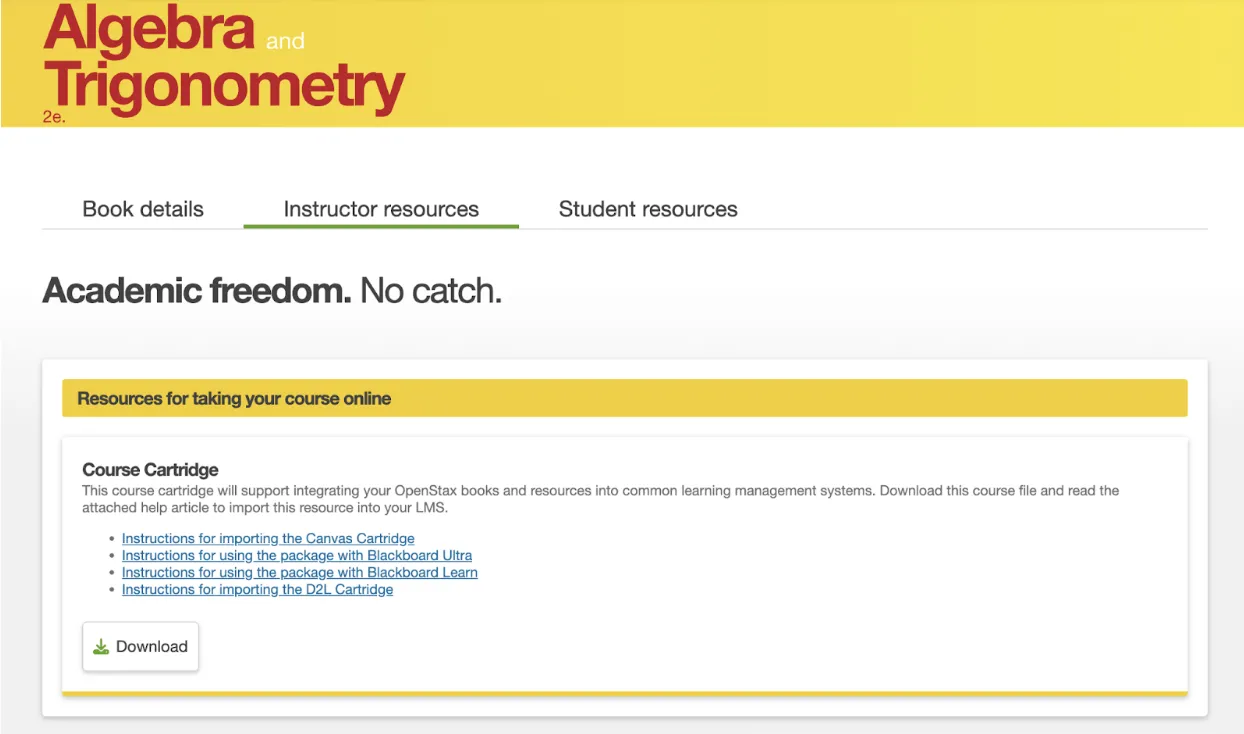
Where to find LMS course cartridges for OpenStax textbooks. For all books, the course cartridges are available on the Instructor resources tab. Above are the course cartridges for Algebra and Trigonometry 2e.
After you download the course cartridge, follow the instructions for importing the cartridge or using the package within your LMS: Instructions for importing the Cartridge for theSpring (D2L).
Syncing "Assignable" textbook
Assignable beta is a free tool that allows instructors to assign OpenStax textbook readings in theSpring. You can assign entire chapters or specific sections based on your curriculum.
In addition to assigning readings to your students, Assignable also allows you to build customized assignments directly in theSpring. These assignments are designed to meet a wide range of learning needs. They also include carefully designed learning progressions that support students as they engage with complex concepts. Students complete these assignments directly in theSpring, so there’s no need to visit an external website or pay for an access code.
Currently, you can assign pre-reading and post-reading assessments featuring multiple-choice questions. You can also include additional culturally responsive and interactive materials — like diagrams, discussion prompts, and videos — from the OpenStax Resource Library.
Assignable is currently offered for the following OpenStax textbooks:
- Anatomy & Physiology 2e
- Biology 2e
- Concepts of Biology
- Introduction to Sociology 3e
- Psychology 2e
- U.S. History
In the future, Assignable will be available for even more titles.
Assignable beta has already been integrated with theSpring. To use this integration, navigate to the top-level content module where you would like to integrate an assignment and click on Upload/Create > Create a File.
Give the new file an appropriate name, type any needed contextual information in the HTML editor, select the bit of text that will serve as the hyperlink, click on the “Insert Quicklink” icon, and choose OpenStax.

_____________________________________________________________

Next, choose the items you would like to integrate into this particular content module and then click “Review Assignment”.

This creates an “Assignment” in OpenStax, but you are not required to utilize it as such in theSpring. Once you are satisfied with the content, click “Create”.

Finally, click “Save and Close”.
Office
Our office is on the second floor of the library (Library 222), however, we are currently working remotely.
Hours
Our virtual office hours are M-F: 8:30am – 4:30pm.
The best way to reach us is by email or submitting a Help Desk ticket.
leds@skidmore.edu